The AI business card scanner that turns a card into a follow-up-ready lead.
Snap the card at your booth. The scanner turns it into an editable lead, and Analyst looks up the company and the people behind it. Free, no app and no login to scan.
no app · no login · scanning is free- 1 · the card in your hand
John Doe
Export Manager · Northwind Trading Co.
john.doe@northwindtrading.example · +1 555 000 0000 - 2 · the structured contact — every field editable
- Name
- John Doe
- Title
- Export Manager
- Company
- Northwind Trading Co.
- john.doe@northwindtrading.example
- Phone
- +1 555 000 0000
- Notes
- wants FOB price, 2 containers
- 3 · Analyst looks up the company and related contactsCompanyCompany profileRelated contactsAgentNorthwind Trading Co.foundfound by AnalystAnalyst
- 4 · Outbound drafts the follow-up from the card, your notes and Analyst’s lookupOutbound Agent
Outbound drafts the follow-up from the card, your notes and Analyst’s lookup
Grounded in the card, booth notes and the company lookup.
- Email 1 · introductiondraft
- Email 2 · useful contextdraft
- Email 3 · follow-updraft
Where expo leads actually get lost.
Lost cards
Three days of conversations end as a pile of paper in a jacket pocket. Some cards never make it home.
Missing notes
“Wants FOB price” lived in your head. A week later, every card looks the same.
Delayed entry
The spreadsheet gets typed days later — misspelled emails included — while the lead goes cold.
Venue Wi-Fi
Hall internet drops when you need it. Photos wait on your phone — batch upload them when you’re back online.
Every card should become a clean, structured lead at the moment of capture.
Built for the rhythm of a trade-show day.
Use the browser on the phone already in your hand. This business card scanner works as a card scanner app without an install: capture a promising conversation immediately, or catch up from card photos after the hall quiets down.
Scan now or batch later
Photograph one card during the conversation, or select multiple card photos when you have time to review them.
Correct before handoff
Check names, titles, phone numbers and emails while the card is still in front of you. Every extracted field stays editable.
Keep the reason to follow up
Add what they requested, what you promised and when to respond. The note makes the later email specific instead of generic.
Try the workflow with one real card.
No app and no login to scan. Every field stays editable.
Your leads, in the shape your team already uses.
Event lead capture is only useful if the leads land where work happens. Three ways out, today:
Excel workbook
One row per lead in an .xlsx file. Open it in Excel or upload it to Google Sheets, then review the fields before your team imports them elsewhere.
EximAgent collection
Move reviewed leads into an EximAgent collection to enrich the company, inspect shipment evidence and prepare follow-up.
view in EximAgentAgent-ready NDJSON
A machine-readable export your own AI agent can work with — company and contact together, one object per lead.
export.ndjsonDirect phone-contact sync and native CRM connectors are on the roadmap. Today, the Excel workbook and NDJSON export are the supported handoff.
wants FOB price for 2 containers · ships to Rotterdam · follow up Tuesday
Once the batch lands in EximAgent, each contact carries a follow-up stage so nothing slips. Per-teammate attribution — who scanned which card — arrives with accounts; it is on the roadmap, not on this page as a promise.
- A structured contact from one photo.
- Every field editable, right on your phone.
- Analyst looks up the company and related contacts.
- Free to scan, with no app and no login.
See what the scanner reads from your card.
Test one card, review the fields and decide from the result.
Capture in parallel. Keep the line moving.
A lead retrieval app or trade show lead capture app should not create another queue. Give every rep the same browser link and let each person review their own contacts.
Roadmap: combined cross-device lists, duplicate detection and automatic per-rep ownership.No rented scanner to pass around
Each representative uses the phone already in hand, with no app installation before the fair.
No central data-entry queue
Each rep checks their own names, notes and contact fields before download or handoff.
No missing booth context
The event and conversation note stay attached to the contact instead of disappearing into a paper-card pile.
Which of these cards are real buyers?
A card tells you who they say they are. Customs data tells you what they actually trade.
Inside EximAgent, review the company against shipment records where coverage is available: recorded import activity, trading corridors and recurrence. An absence of records does not prove an absence of trade, so check the coverage label and underlying evidence before qualifying the lead.
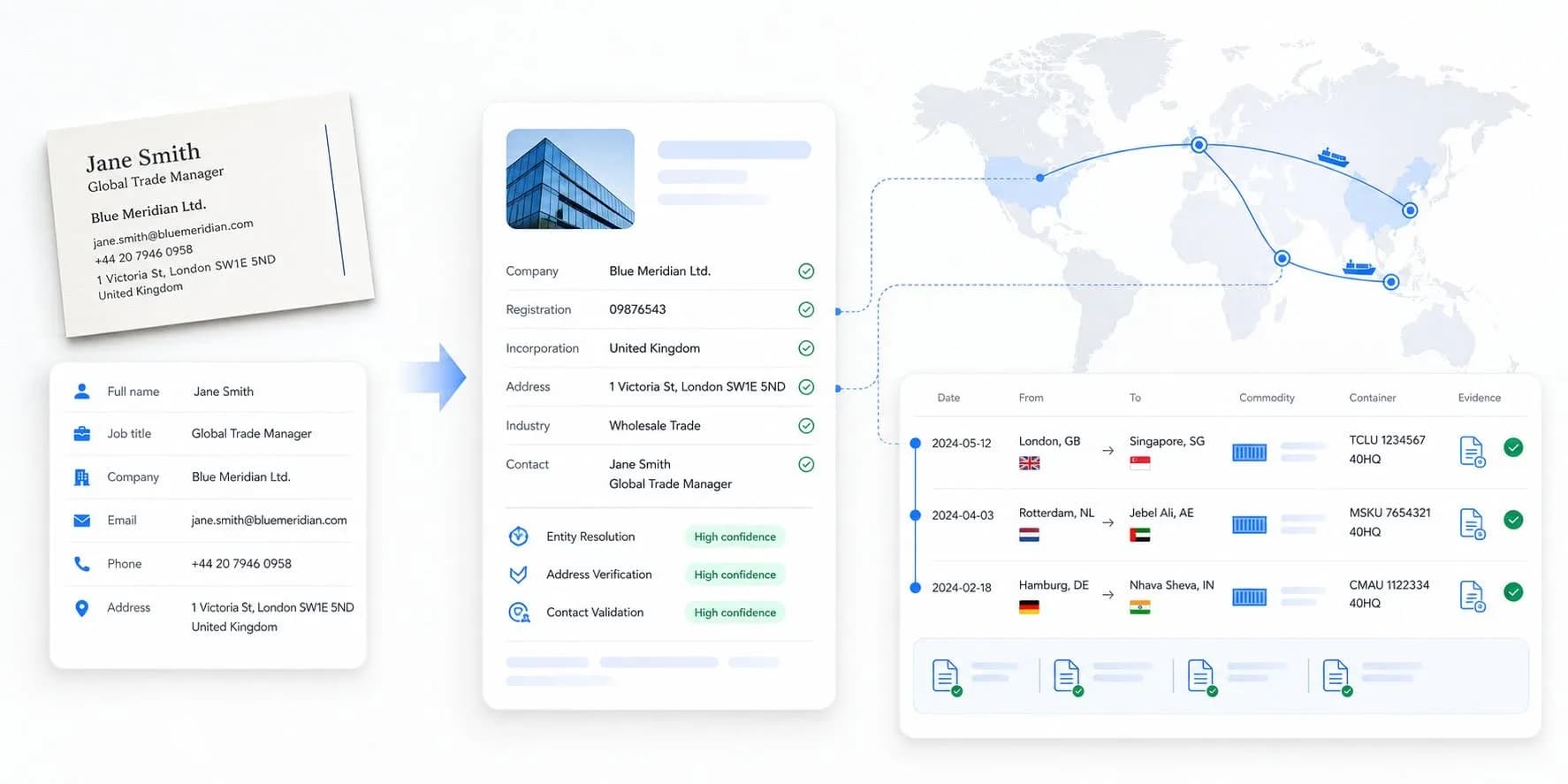
Follow up while the booth conversation is still remembered.
A prepared post-expo campaign helps your team respond sooner, use the context captured at the fair and keep every promising contact moving.
Reach leads before interest cools
Prepare the first response from reviewed cards and booth notes instead of waiting for manual data entry after the event.
Give every email a reason to exist
Use available company and trade context to make the message relevant without treating historical activity as current purchase intent.
Explore company intelligence →Know who needs the next touch
Keep drafts, follow-up stages and company notes together so the team can pick up the conversation without starting over.
- 1
Scan at the booth
Free. No app, no login, no card required — the paper kind excepted.
- 2
Keep your leads
Sign in to download and keep what you scanned. That sign-in creates your EximAgent account — we say so here, not in the fine print.
- 3
Go deeper when ready
Each scan already runs Analyst’s company and contact lookup. Qualifying and outreach run inside EximAgent, and the scanner itself stays free.
Yes. Scanning at the booth is free, with no app and no login. To download and keep your leads, sign in — that sign-in creates your EximAgent account.
The scanner reads the card, and Analyst looks up the company and the person and finds related contacts. You can then keep the lead, download it, or hand it to Outbound for follow-up.
No. The scanner is a free tool. Expo is an AI teammate that talks with visitors at your booth, by voice or text, in any language. We set it up with you.
The scanner reads the card as an image, and every field stays editable, so you can fix any misread on the spot.
The scanner reads the card as an image rather than matching a fixed template, so vertical and design-heavy cards are read the same way. When a layout confuses it, you fix the field inline.
It reads cards in many layouts and scripts. If a field comes out wrong, fix it inline.
Extraction needs a connection. When hall internet drops, keep shooting photos — they wait in your phone’s gallery — and batch-upload the pile when you are back online.
Duplicate detection is not built yet. Today you review your device’s event list and edit or remove rows before export — we would rather say that than pretend.
Yes. Upload mode accepts multiple individual card photos in one selection. Photograph each card, select the batch, then review the extracted leads together.
Download an Excel .xlsx workbook or an agent-ready NDJSON file. You can also continue with reviewed leads in EximAgent for enrichment and follow-up.
Today it reads paper business cards. Badge scanning is on the roadmap — it is not a badge scanner app yet, and we would rather tell you that than surprise you at the venue.
The card image is sent to the reading model for field extraction and is not stored. Without an account, extracted records remain in a short-lived session; signing in claims them. Review or remove rows before export, and read the privacy policy for account-data choices. There is no scanner subscription to cancel.
Have a business card in front of you?
Scan it now, review the extracted fields and see whether the workflow belongs at your next event.