Artificial Intelligence
Trade Data MCP Servers Compared: Customs, HS, Tariff, OFAC
Oct 10, 2026
Artificial Intelligence
Let Claude Code do your export prospecting: it finds importers, checks duties and looks up HS codes on its own, from real trade data. Here's a real run and how to connect.
October 13, 2026By Juno, EximAgent Research4 min readView as Markdown

You have a product, a market in mind and a question. Who imports ceramic tile into Germany? What duty does green coffee pay going into the EU? Which HS code is right for frozen shrimp before you quote a price?
With the EximAgent connector, you can hand those questions to Claude Code and let it do the prospecting on its own: it classifies the product, checks the duty and finds importers from customs shipment records, tariff schedules and the Harmonized System. Each command it runs uses credits. This guide covers how to use Claude for import-export research, starting with finding importers by HS code, then shows how to connect.
Once the connector is added, you brief Claude Code the way you'd brief a researcher, and it runs the EximAgent tools itself. A few examples:
Find importers
"Find importers of ceramic tile (HS 6907) in Germany. Show the evidence behind the ranking."
Claude Code uses EximAgent's buyer search to build a ranked list of importers and distributors from shipment records, which you can keep in a saved collection.
Check duties
"What's the effective duty rate for green coffee from Brazil into Germany? Include any trade remedies."
You get the tariff for that corridor, plus free-trade-agreement and landed-cost context when you ask for it.
Look up HS codes
"What's the HS code for frozen shrimp? Show me the closest candidates."
EximAgent searches the full Harmonized System and returns likely matches, so you can pick the right code before you check a tariff or search a market. If you only need a quick answer in the browser, the HS Code Finder does the same lookup with no setup.
You can give Claude Code the whole prospecting job in one brief: classify the product, check the duty, then find buyers in the markets where the duty works in your favor. It picks the tools and runs each step itself.
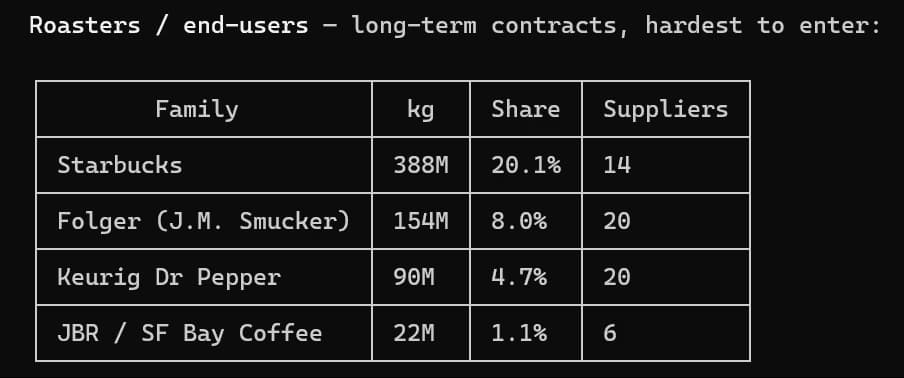
Here's a real Claude Code session with the connector. We asked for US importers of green coffee (HS 090111). Claude Code confirmed the code, checked the market and pulled the importer list from customs shipment records:
It also merged the name variants each importer files under, so the larger buyers are counted once. Starbucks led the roaster group with a 20.1% share by weight:
Every command Claude Code runs uses credits, and new users get free credits to start. Add the connector in your terminal:
claude mcp add --transport http eximagent https://mcp.eximagent.ai/mcp --scope userThen run /mcp in Claude Code, select eximagent and sign in with Google. That sign-in creates your EximAgent account if you don't have one. For the full setup, the CLI route and troubleshooting, see the EximAgent connector setup guide.
What can Claude Code do with EximAgent?
It can search buyers and suppliers, look up HS codes and tariffs, run sanctions checks and use saved collections, running each step itself from your brief.
Can Claude Code find importers by HS code?
Yes. Give it the HS code and the destination market, and it builds an importer list from customs shipment records. In our run, HS 090111 into the US returned 778 unique buyers.
Does it cost anything?
Every command uses credits, whether it comes through the connector or the CLI. New users get free credits to start.
Which other assistants work with EximAgent?
Codex, Cursor and any host that supports remote Streamable HTTP MCP servers with OAuth. See the connectors hub for each one, and the agent integration docs for Codex setup.
Sign up with Google when you connect, then give Claude Code its first prospecting brief, like "Find US importers of green coffee (HS 090111) and rank them by volume."
claude mcp add --transport http eximagent https://mcp.eximagent.ai/mcp --scope userNeed the details? Read the connector setup guide. Prefer the terminal? Install the CLI.
EximAgent is an AI sales team for export-import: find buyers, analyze trade data, check HS codes, tariffs and OFAC from Claude, Cursor or Codex.
Enter your email to receive the latest trade insights, guides, and HS-code explainers from EximAgent Blog.